Copy Task


A task can be easily copied to be re-used and save valuable time creating each task again and again.

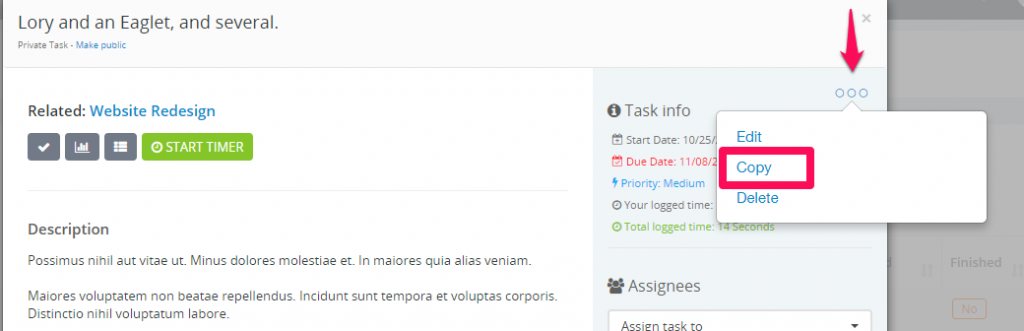
While the task modal is opened on the top right area click on the 3 dots icon.
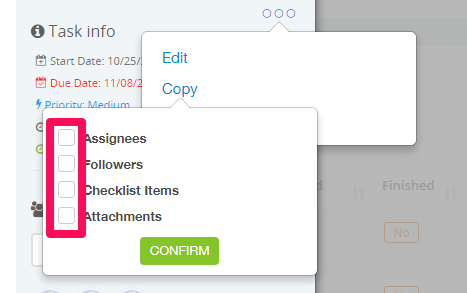
Additionally by the regular task data you can copy assignes, followers, attachments and checklist items.

If any of the them exists in this task will be shown as checkbox items to check/uncheck while copying the task.
Make sure if you are copy recurring task to re-check the task data in the edit area to prevent repeating twice because the task from where you are copying is already recurring.

Did you find this article useful?


  • The total values are calculated based on the Billing Type

    By default the system ships with 5 predefined statuses, Not Started, In Progress, Testing, Awaiting Feedback, Complete but you can inject new statuse...

  • Recurring Tasks

    Recurring tasks is a feature that allows you to create tasks that will repeat on a given period. To create recurring task go to the Tasks menu in the ...

  • Task Timesheets

    Task timesheets is all started timers for specific task, timesheets are stored separately for each task started by the task assignees. To view all ta...

  • Linking task to features

    Task can be linked to any important features in the system to keep track of your work and assign important actions to your agents. Go to Tasks menu i...

  • Bill Tasks

    1. To invoice non-project tasks when creating invoice there is dropdown just to the right side of the items dropdown BILL TASKS. After you select a cu...