Linking task to features


Task can be linked to any important features in the system to keep track of your work and assign important actions to your agents.

Go to Tasks menu item from the main admin menu and on the top right button click New Task
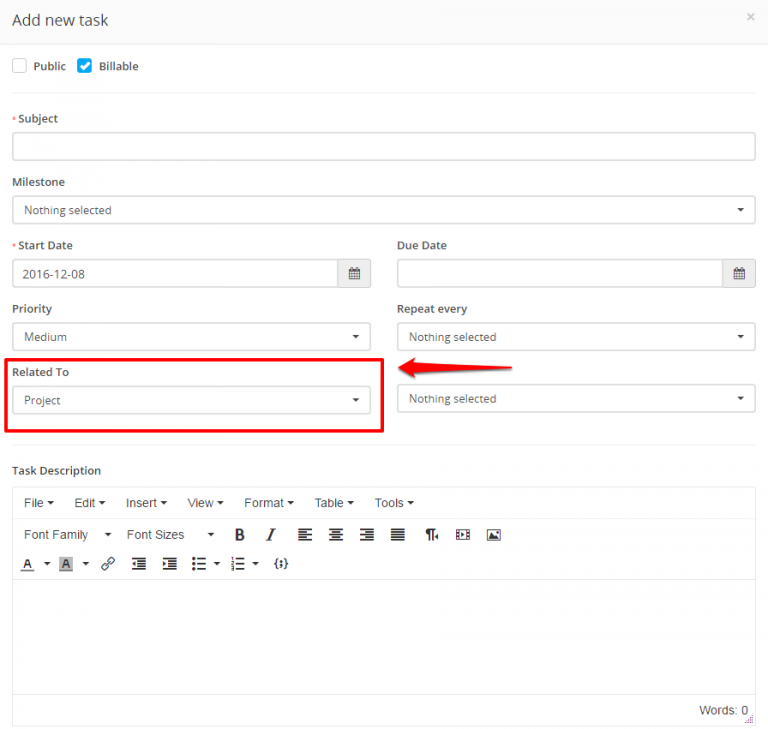

On the Related to field select where this task will be linked.

After you select the feature where the task will be linked on the right side a dropdown will be shown to select specific eq. project.

Tasks can be related to many features.


Did you find this article useful?


  • The total values are calculated based on the Billing Type

    By default the system ships with 5 predefined statuses, Not Started, In Progress, Testing, Awaiting Feedback, Complete but you can inject new statuse...

  • Recurring Tasks

    Recurring tasks is a feature that allows you to create tasks that will repeat on a given period. To create recurring task go to the Tasks menu in the ...

  • Task Timesheets

    Task timesheets is all started timers for specific task, timesheets are stored separately for each task started by the task assignees. To view all ta...

  • Bill Tasks

    1. To invoice non-project tasks when creating invoice there is dropdown just to the right side of the items dropdown BILL TASKS. After you select a cu...

  • Add task assignees

    To add task assignees open the task by clicking on the task subject while the tasks are listed. On the right side of the task modal there will be a dr...